
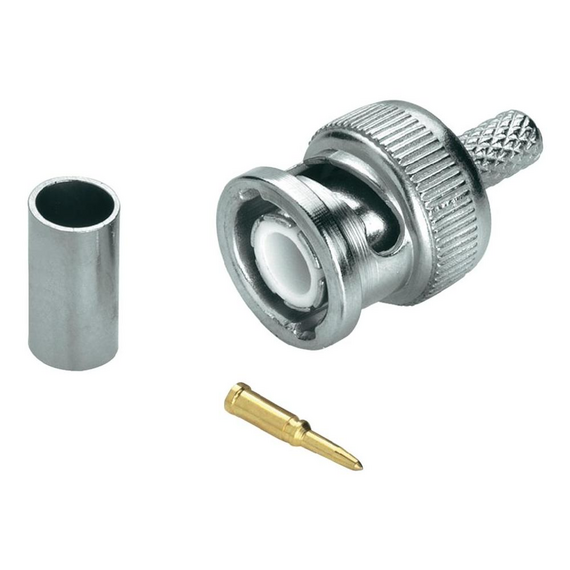
BNC Crimp On Connector

Unless selecting a vari-focal camera (with an adjustable lens) It is important to select the correct camera lens option for where the camera is to be positioned. A smaller lens will give you a wider angle but will be "zoomed out more", while a bigger lens will narrow the angle down and "zoom in more". See below to give you some idea on angles of Megapixel HD Cameras:
| Lens in mm | Approx Viewing Angle (degrees) | Ideal Distance (metres) | Typical usage/notes |
|---|---|---|---|
| 2.8 | 106 | <6 | For seeing as much of the immediate area as possible such as above a doorway/low down/garage soffits (edges can appear slightly warped/distorted) - clearly "zoomed out" |
| 3.6/4 | 83-90 | <12 | A great general purpose option giving great coverage still in the corner of a room or higher up on second floor soffits with less distortion - more of a natural "zoom" |
| 6 | 56 | 6-20 | Narrows down the angle and zooms in to look past the immediate area a little to gain more detail - down a driveway for example from higher up |
| 12 | 24 | 20+ | Zooms in significantly more to look at a gate, entrance or adjascent building |
| 16 | 19 | 24+ | As above but more so |
The amount of hard drive space you require is dictated by how many cameras, as well as their resolution and frame rate settings. Finally you can often make your storage space last a lot longer by enabling motion detected recording rather than continuous, especially if there are long periods of no activity.
|
Resolution (Megapixels) |
Days of storage provided by 1TB per camera (continuous - full 25 frames per second) |
Days of storage provided by 1TB per 4 cameras (continuous - full 25 frames per second) |
Days of storage provided by 1TB per 4 cameras (50% motion- 15 frames per second) |
|---|---|---|---|
| 1 | 44 | 11 | 36 |
| 2 | 22 | 5 | 18 |
| 3 | 17 | 4 | 14 |
| 4 | 11 | 3 | 9 |
| 5 | 9 | 2 | 8 |
| 6 | 8 | 2 | 6 |
| 8 (4K) | 5 | 1 | 4 |
| 12 | 4 | 0.5 | 3 |
As a rule of thumb we recommend a minimum of 2 Terabytes per 4 x 2-4MP HD cameras, as this should give you 2 weeks to a month with a few adjustments on motion detected recording. You may only require the full 25 frames per second on certain cameras if things are fast moving.
(All of our hard drives come fitted and are CCTV specific from one of the major brands)
- FREE UK Mainland Delivery for orders over £240
- Premium Services Available and Worldwide
- View all details here
12/24/36 months warrantiesGuarantee for all purchased goods in our online store is 1 year, most are 2.
1 Hour Delivery window notificationYou receive SMS messages about each stage of your order.
Return and exchange with easeYou can return the items purchased within 14 days. The goods must be in normal condition and have all the factory packages.
Price match promiseWe will match or beat any other Authorized Reseller.
- Debit/Credit Card
- Visa, MasterCard, AMEX
- Paypal (Inc finance)
- Bank transfer (BACS)
BNC Crimp On Connector - To be used with RG59-SG50
No reviews found
